System architecture
SciGraphs runs on Blender’s Python interpreter. Data acquisition, analysis and visualization live in separate modules that meet at a common graph abstraction.
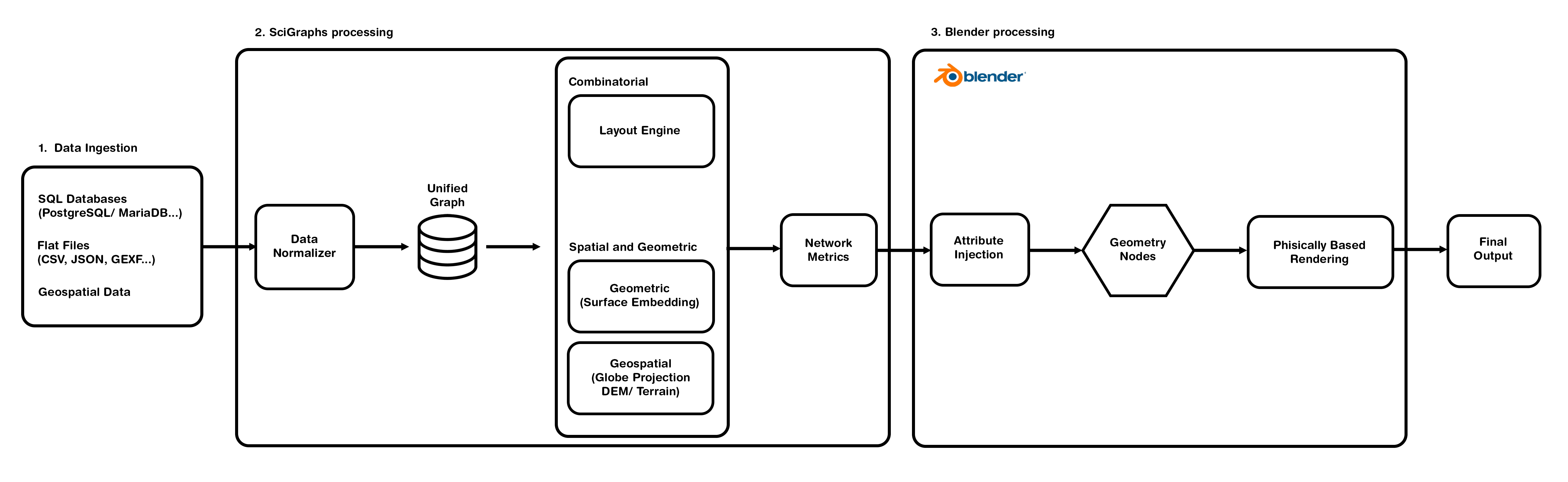
The unifying data structure
The network is stored as an adjacency list with node and edge attributes, which is what bridges the external libraries to Blender’s own data. Metrics computed during analysis are written into the Blender mesh as named attributes, so a graph can be re-styled or animated on a different attribute without recomputing the layout.
Bundled scientific stack
| Library | Role |
|---|---|
| NetworkX | Graph data structures and algorithms (traversal, centrality, clustering, community detection). |
| igraph | High-performance C++ layout algorithms (Fruchterman-Reingold, Kamada-Kawai, DrL, LGL, Davidson-Harel, Graphopt). |
| rustworkx | Fast graph operations used by the City2Graph module. |
| NumPy / SciPy | Array operations and linear algebra. |
| pandas | Tabular data handling. |
| OSMnx | Download and construct graph representations of OpenStreetMap data. |
| GeoPandas / Shapely / pyproj | Spatial operations and coordinate projection. |
| geopy | Geocoding services (Nominatim). |
| city2graph / momepy / libpysal | Heterogeneous urban network analysis. |
| overturemaps / pyarrow | Overture Maps REST/parquet access. |
| duckdb | GTFS and transportation analysis. |
| scikit-learn | Proximity-graph construction (KNN, etc.). |
| Pillow | Texture and imagery processing. |
scigraphs-utils |
Native Graphviz layout bindings (project-maintained). |
pysurprise |
SurpriseMe community detection and the Surprise metric (project-maintained). |
Analysis runs in the same process as the render, so nothing has to be exported to another tool and reimported.
Geometry Nodes and instancing
Giving every node its own mesh object costs more dependency-graph evaluation than it is worth. SciGraphs instead consolidates the whole graph into a single container object holding point-cloud data, then instances the node spheres and edge cylinders with Geometry Nodes.
In raw mode (graph stored as mesh topology) the viewport holds over 60 FPS up to roughly 200,000 nodes and stays above 20 FPS at \(10^6\). In visual mode, after the Setup Visual operator, interactive rates hold to about 500,000 nodes on consumer hardware.
Source layout
Three distributions live in this repository. Two of them install without Blender.
SciGraphs/          # the Blender add-on
├── core/           # the Blender-side half: mesh builders, terrain and raster
│                   #   projection, caches keyed on live scene objects, the
│                   #   viewport text overlay, the pipeline executor
├── properties/     # Blender PropertyGroups (scene settings)
├── api/            # the scripting API
├── ui/
│   ├── operators/  # the buttons that do the work
│   └── panels/     # the sidebar UI documented here
└── utils/          # dependency loading, logging, helpers

core/               # distribution scigraphs-core, import scigraphs_core:
                    #   graph algorithms, every layout, colormaps, tabular and
                    #   geospatial IO, the OSMnx and city2graph wrappers, the
                    #   pipeline schema and parser

engine/             # distribution scigraphs-engine, import scigraphs_engine:
                    #   structural filter channels, backbone extraction, edge
                    #   bundling, PNG rendering through wgpu
Neither core/ nor engine/ imports bpy. blender_manifest.toml lists both as wheels, so Blender installs them the way it installs networkx or osmnx, and nothing is vendored into the extension zip. Away from Blender they are ordinary pip installs.
The Panel Reference mirrors ui/panels/: each sidebar tab is a panel group, each subpanel a collapsible section within it. To drive the same operations from Python, see the Python API.