Nothing is analyzed here. The notebook checks that the kernel really is Blender, that city2graph is installed inside it, and that the SciGraphs operators are registered; a last cell puts a cube in the 3D viewport, which proves the kernel and Blender are one process. It also shows the quirk the rest of the sequence depends on: the working directory is Blender’s, not the notebook’s, so the helpers in notebooks/tools/ are found through the extension’s notebook_dir preference.
No network access needed. Run it first.
00 · Environment check
Checks that the kernel really is Blender, that city2graph is installed inside it, and that the SciGraphs operators are registered. A failure here will repeat in every other notebook.
1 · Load the helpers
The working directory is not the notebook’s, so Path.cwd() / "tools" will not do: the kernel lives inside Blender and its cwd is wherever Blender was launched from. The reliable clue is the extension’s notebook_dir preference, the folder JupyterLab serves.
import pathlibimport sysdef find_repo():"""Locate the SciGraphs repository, without relying on the cwd. In a normal Jupyter the kernel starts per notebook with the cwd set to its folder. Not here: the kernel lives inside Blender and existed before you opened anything, so the cwd is wherever Blender was launched from. What the extension does know is which folder it is serving to JupyterLab. """ candidates = []try:import bpy prefs = bpy.context.preferences.addons["bl_ext.user_default.jupyter_blender"].preferences candidates.append(pathlib.Path(bpy.path.abspath(prefs.notebook_dir)))exceptException:pass candidates.append(pathlib.Path.cwd())for base in candidates:for directory in (base, *base.parents):if (directory /"SciGraphs"/"api"/"graphs.py").is_file():return directoryraiseRuntimeError("Cannot find the SciGraphs repository. Point at it by hand:\n"" sys.path.insert(0, '/path/to/SciGraphs-1/notebooks/tools')")sys.path.insert(0, str(find_repo() /"notebooks"/"tools"))# `nb` must import first: it puts this repository on sys.path, so the# `SciGraphs` import below reads this tree, not the copy Blender installed.import nbfrom nb import checkfrom SciGraphs import api as sgprint("kernel cwd:", nb.rel(pathlib.Path.cwd()))# Relative, because these outputs are stored in the .ipynb and published, and# an absolute path would only name the machine that ran them.print("notebooks/ :", nb.rel(nb.NOTEBOOKS_DIR) or".")print("repo :", nb.rel(nb.REPO_ROOT) or".")print("outputs :", nb.rel(nb.OUT_DIR))
Blender 5.2.0 LTS
Python  3.13.13
scene   Scene
file    (unsaved)
3 · Full report
Versions of the geospatial stack, plus the registered operators.
report = nb.env_report()
--------------------------------------------------------------
Blender          5.2.0 LTS
Python           3.13.13
--------------------------------------------------------------
Required:
  [ok] city2graph       0.3.1        the library this whole suite is about
  [ok] geopandas        1.1.3        GeoDataFrames — city2graph's canonical data structure
  [ok] shapely          2.1.2        geometry
  [ok] osmnx            2.0.7        OpenStreetMap street networks and POIs
  [ok] networkx         3.6          graph algorithms
  [ok] libpysal         4.14.1       spatial weights, used by contiguity_graph
  [ok] momepy           0.11.0       urban morphometrics, used by the tessellation
  [ok] pandas           3.0.2
  [ok] numpy            2.3.4
Optional:
  [--] torch            MISSING (ModuleNotFoundError) only needed for gdf_to_pyg and GNN work
  [--] torch_geometric  MISSING (ModuleNotFoundError) same
  [ok] matplotlib       3.11.0       static plots; the notebooks work without it
  [ok] duckdb           1.2.2        GTFS loading
--------------------------------------------------------------
SciGraphs        258 operators registered
  scene.scigraphs   True
  scene.city2graph  True
--------------------------------------------------------------
Nothing in the required list may be absent. torch and torch_geometric may be, and are absent in the default installation: only gdf_to_pyg(), the bridge to graph neural networks, needs them. Graphs build without them, you just cannot train a model inside Blender.
missing_deps = nb.missing(report)check("all required dependencies are present",not missing_deps, ", ".join(missing_deps) if missing_deps else"")has_torch =notstr(report["optional"]["torch"]).startswith("MISSING")check("PyTorch available (optional)", has_torch,"without torch, gdf_to_pyg() is unavailable"ifnot has_torch else"")
[PASS] all required dependencies are present
[FAIL] PyTorch available (optional) — without torch, gdf_to_pyg() is unavailable
False
4 · The city2graph API
The public functions, by area. The check is that the installed version exposes all of them.
import city2graph as c2gAPI = {"Morphology": ["segments_to_graph", "morphological_graph","create_tessellation", "dual_graph"],"Transport": ["load_gtfs", "travel_summary_graph", "get_od_pairs"],"Mobility": ["od_matrix_to_graph"],"Proximity": ["knn_graph", "fixed_radius_graph", "delaunay_graph","gabriel_graph", "relative_neighborhood_graph","euclidean_minimum_spanning_tree", "waxman_graph","contiguity_graph", "bridge_nodes", "group_nodes"],"Metapaths": ["add_metapaths", "add_metapaths_by_weight"],"Conversion": ["gdf_to_nx", "nx_to_gdf", "gdf_to_pyg", "pyg_to_gdf","nx_to_rx", "rx_to_nx"],"Interpretation": ["plot_graph", "create_isochrone"],"Overture": ["load_overture_data", "process_overture_segments","get_boundaries"],}print(f"city2graph {c2g.__version__}\n")absent = []for section, functions in API.items(): gone = [f for f in functions ifnothasattr(c2g, f)] absent += goneprint(f"{section:<22}{len(functions) -len(gone)}/{len(functions)}")check("the city2graph API is complete", not absent,", ".join(absent) if absent else"")
city2graph 0.3.1

Morphology             4/4
Transport              3/3
Mobility               1/1
Proximity              10/10
Metapaths              2/2
Conversion             6/6
Interpretation         2/2
Overture               3/3
[PASS] the city2graph API is complete
True
5 · The SciGraphs operators
Operators live under bpy.ops.scigraphs. Those wrapping city2graph carry the c2g_ prefix, plus the proximity and metapath ones.
all_ops =dir(bpy.ops.scigraphs)c2g_ops =sorted(n for n in all_opsif n.startswith("c2g_")or n in {"generate_proximity_graph", "generate_multilayer_graph","generate_group_nodes_graph", "create_street_dual_graph","bridge_amenities", "compute_metapaths","compute_metapaths_by_weight", "compute_metapaths_wizard"})print(f"{len(all_ops)} operators registered, {len(c2g_ops)} from city2graph:\n")for name in c2g_ops:print(" bpy.ops.scigraphs."+ name +"()")check("the city2graph operators are registered", len(c2g_ops) >=20,f"{len(c2g_ops)} found")
Create geometry from the notebook and watch it appear in the viewport: with the Blender window next to you, the cube shows up now.
before =len(bpy.data.objects)bpy.ops.mesh.primitive_cube_add(size=1.0, location=(0, 0, 0))cube = bpy.context.active_objectcube.name ="Notebook_Test"after =len(bpy.data.objects)print(f"objects: {before} -> {after}")print("active :", bpy.context.active_object.name)check("the notebook modifies the live scene", after == before +1)
objects: 3 -> 4
active : Notebook_Test
[PASS] the notebook modifies the live scene
True
And remove it, to leave nothing behind.
bpy.data.objects.remove(cube, do_unlink=True)print("objects in the scene:", len(bpy.data.objects))
objects in the scene: 3
8 · The render engines
There are two, and these notebooks use both.
The SciGraphs RenderEngine draws from the interactive preview’s GPU buffers rather than from geometry: graphs only, no materials, shadows or ground. It owns sg.preview.backbone, which thins a nearly complete accessibility graph without touching the mesh, so no other renderer sees the thinning. SciGraphs.api.thin does the same top-k-per-node in Python and puts the result in the data instead; its docstring has the rest.
Figures come from nb.figure(), not nb.figure_preview(): the GPU preview is only viewport draw calls, invisible to any renderer, so EEVEE needs the add-on’s other path, scigraphs_display_engine = 'GEOMETRY_NODES', a modifier that instances spheres on the vertices and sweeps tubes along the edges. Notebook 13 covers terrain and buildings.
Both have to be registered. Check the graphics backend first.
# A registered `RenderEngine` is not an attribute of `bpy.types`, so walk the# subclasses. `HydraRenderEngine` is a base class with no `bl_idname`, hence# the getattr.engines = [getattr(c, "bl_idname", None)for c in bpy.types.RenderEngine.__subclasses__()]engines = [e for e in engines if e]print("registered engines:", engines)check("the SCIGRAPHS engine is registered", "SCIGRAPHS"in engines)# The preference is the one that lies: `--gpu-backend opengl` overrides it for# the process without writing it back, so such a session still reports VULKAN.# `backend_type_get()` has the truth but raises `SystemError` under# `blender -b`, with no GPU module initialized. Neither can be asked unguarded.import gpupreference =str(bpy.context.preferences.system.gpu_backend).upper()try: active =str(gpu.platform.backend_type_get()).upper()except (SystemError, AttributeError) as exc: active =f"unavailable ({type(exc).__name__})"backend = preference ifnot active.isalpha() or active in ("NONE", "UNKNOWN") \else activeprint("\ngraphics backend in preferences:", preference)print("backend actually drawing: ", active)if backend != active:print(" no GPU context here, so the preference is the best guess available")
registered engines: ['CYCLES', 'SCIGRAPHS', 'SCIGRAPHS']
[PASS] the SCIGRAPHS engine is registered

graphics backend in preferences: VULKAN
backend actually drawing:       OPENGL
Vulkan breaks small nodes. On Blender’s Vulkan backend, the default on Linux since 4.5, gpu.state.point_size_set() does nothing for the shaders the add-on builds, so every POINT or DISK node comes out exactly 1 pixel, viewport and render alike. Shaders built with GPUShaderCreateInfo never write gl_PointSize, and on Vulkan an unwritten PointSize is undefined; Blender’s builtin shaders write it and keep their size in the same build, so this is not a driver bug. Two ways out, both used:
--gpu-backend opengl (launch.sh --opengl, always in verify_notebooks.py).
SPHERE impostors, real geometry that ignores point size, the default for nb.render_preview().
ifstr(backend).upper() =="VULKAN":print("You are on Vulkan. The renders in these notebooks use SPHERE, so they")print("will come out fine anyway, but if you switch to node_style='POINT' you")print("will see 1-pixel nodes. For that, start with --gpu-backend opengl.")else:print("Backend without the point-size limitation.")
Backend without the point-size limitation.
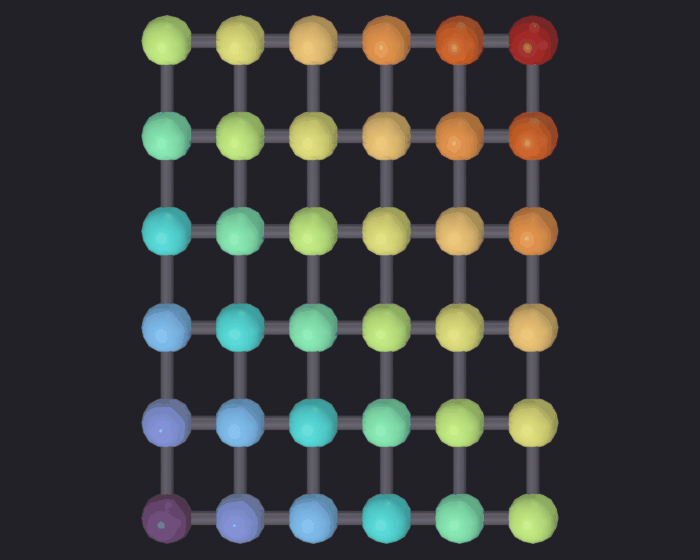
Proof that rendering works at all, on a 6x6 lattice of invented points. No terrain or buildings under this one: a city under an abstract grid would misrepresent it, and the geographic notebooks add one where it means something.
Figures in the suite render straight down through an orthographic camera (render_eevee’s default, view='TOP'): image axes are world axes, north is up, no splay at the frame corners. Color comes through color_attribute= from a number the notebook computed, here node_value, the x + y ramp the lattice was built with, which measures nothing but proves the attribute reaches the render. Notebooks 00 to 07 share look='ink', the blackest of the five backdrops in sg.render.PRESETS, its turbo ramp running from dark blue at x + y = 0, the bottom-left node, to red at the top-right, so figures differ by data, not palette.
import numpy as npimport pandas as pdimport geopandas as gpdfrom shapely.geometry import LineString, Pointgrid = [(x, y) for x inrange(6) for y inrange(6)]nodes = gpd.GeoDataFrame( {"value": [x + y for x, y in grid]}, geometry=[Point(x *40, y *40) for x, y in grid], index=[f"n{i}"for i inrange(len(grid))], crs="EPSG:25830")pairs = []for i, (x, y) inenumerate(grid):for j, (u, v) inenumerate(grid):if j > i andabs(x - u) +abs(y - v) ==1: pairs.append((f"n{i}", f"n{j}"))edges = gpd.GeoDataFrame( {"weight": np.arange(len(pairs), dtype=float)}, geometry=[LineString([nodes.geometry[a], nodes.geometry[b]]) for a, b in pairs], index=pd.MultiIndex.from_tuples(pairs), crs="EPSG:25830")sg.graphs.clear_scene(keep_anchor=False)anchor = sg.graphs.anchor(39.47, -0.376, scale=0.001, name="Anchor_Test")mesh = sg.graphs.from_gdf(nodes, edges, name="Grid_Test", ref=anchor, coll="Render_Test")print(sg.graphs.summary(mesh))# Worth checking before coloring anything: POINT paints the node spheres and# leaves the tubes neutral, EDGE paints the tubes. Guessing wrong is how a# figure comes back monochrome.print("node_value domain:", sg.render.attribute_domain(mesh, "node_value"))nb.figure(mesh, "renders/00_smoke/grid", resolution=(700, 560), width=650, color_attribute="node_value", look='ink')
{'object': 'Grid_Test', 'type': 'MESH', 'num_nodes': 36, 'num_edges': 60, 'is_directed': False, 'vertices': 36, 'mesh_edges': 60, 'attributes': ['position', '.edge_verts', '.corner_vert', '.corner_edge', 'node_id', 'node_value', 'edge_weight']}
node_value domain: POINT
  Promoted 1 edge attribute(s) to point domain for GN propagation
Info: Geometry Nodes modifier added
Info: Attribute -> node_value  ·  node_value -> turbo  [0 … 10] on Point
[PASS] grid.png legible — 26.5% ink (healthy range 0.5–60%)
And the other engine, separately
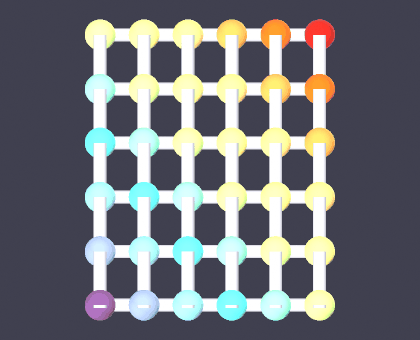
That render proves EEVEE works, the source of the figures in notebooks 13 to 09. Section 8’s "SCIGRAPHS" in engines says only that a class with that bl_idname is registered; an engine whose render() raised on the first call would pass it. Since SciGraphs.api.thin moved the edge backbone into the data, notebooks 17 and 18 no longer render through this engine, so without this cell nothing would.
grid.png stays on EEVEE as the first plate of a suite that shares one style, so the GPU engine gets a check of its own: 420x340, no attribute coloring, the same lattice from the preview’s GPU buffers, and all it has to show is that pixels come back. node_style='SPHERE' because the impostors are real geometry; by the Vulkan note, a POINT render here would prove nothing on the default Linux backend.
smoke_path = nb.render_preview( mesh, "renders/00_smoke/grid_engine_check", resolution=(420, 340), node_style='SPHERE', verbose=False)nb.show(smoke_path, width=420)check("the SciGraphs engine renders, not just registers", nb.ink(smoke_path) >0.005,f"{nb.ink(smoke_path) *100:.1f}% ink from the GPU buffers")
[PASS] the SciGraphs engine renders, not just registers — 30.3% ink from the GPU buffers
True
9 · Sample data in the repository
Some notebooks download from the internet; others work offline from examples/.
resources = {"GTFS São Paulo (zip)": nb.repo("examples", "GTFS", "sao_paulo.zip"),"Test OD matrix": nb.repo("examples", "city2graph_examples","od_matrix_test_files", "od_test_edgelist.csv"),"Test OD zones": nb.repo("examples", "city2graph_examples","od_matrix_test_files", "od_test_zones.geojson"),"Reproducible pipelines": nb.repo("examples", "pipelines"),}for label, path in resources.items(): exists = path.exists() size =f"{path.stat().st_size /1e6:.1f} MB"if exists and path.is_file() else""print(f" [{'ok'if exists else'--'}] {label:<26}{size}")
  [ok] GTFS São Paulo (zip)       14.2 MB
  [ok] Test OD matrix             0.0 MB
  [ok] Test OD zones              0.0 MB
  [ok] Reproducible pipelines
10 · Summary
If every check says PASS, any notebook will run. Recommended order 01 → 07, though apart from 06 (which reuses ideas from 04 and 05) they are independent.
Notebook
Needs network
01 · Morphology
yes (OSM / Overture)
02 · GTFS transport
no
03 · OD mobility
no
04 · Proximity
yes (OSM)
05 · Metapaths and 15 minutes
yes (OSM)
06 · Functional clustering
yes (OSM)
07 · Reproducible pipelines
no
print("Environment ready."ifnot nb.missing() else"Dependencies missing, see above.")