The preceding notebooks are exploratory: you run them top to bottom and the result stays in the scene. For a figure you intend to publish you also need to say exactly what ran, with which parameters and which seed, and to have someone else repeat it.
SciGraphs has a declarative system for that. A JSON or YAML specification describes the whole pipeline (data, analysis, layout, styling, render, exports) and the executor replays it step by step, writing a provenance manifest with hashes. This notebook drives that system from Python: explore in a notebook, then freeze the result as a specification.
A published figure needs a record of what was run, with which parameters and which seed, repeatable by somebody else. A JSON or YAML specification describes the whole pipeline (data, analysis, layout, style, render, exports); the executor replays it step by step and writes a provenance manifest with hashes.
0 · Setup
import jsonimport pathlibimport sysdef find_repo():"""Locate the SciGraphs repository, without relying on the cwd. In a normal Jupyter the kernel starts per notebook with the cwd set to its folder. Not here: the kernel lives inside Blender and existed before you opened anything, so the cwd is wherever Blender was launched from. What the extension does know is which folder it is serving to JupyterLab. """ candidates = []try:import bpy prefs = bpy.context.preferences.addons["bl_ext.user_default.jupyter_blender"].preferences candidates.append(pathlib.Path(bpy.path.abspath(prefs.notebook_dir)))exceptException:pass candidates.append(pathlib.Path.cwd())for base in candidates:for directory in (base, *base.parents):if (directory /"SciGraphs"/"api"/"graphs.py").is_file():return directoryraiseRuntimeError("Cannot find the SciGraphs repository. Point at it by hand:\n"" sys.path.insert(0, '/path/to/SciGraphs-1/notebooks/tools')")sys.path.insert(0, str(find_repo() /"notebooks"/"tools"))import bpy# `nb` must import first: it puts this repository on sys.path, so the# `SciGraphs` import below reads this tree, not the copy Blender installed.import nbfrom nb import checkfrom SciGraphs import api as sg# The executor sets `use_cache` but not `cache_folder`, leaving it relative to# Blender's cwd, so an identical spec re-downloads when replayed from anywhere# else. Point it at `notebooks/data/` before the pipeline fetches anything.nb.osmnx()# Not re-exported by the package; these have to come from the module directly.from SciGraphs.core.repro.executor import run_pipelinefrom scigraphs_core.repro.parser import parse_pipelinePIPELINES = nb.repo("examples", "pipelines")OUTPUT_DIR = nb.out("07_repro")OUTPUT_DIR.mkdir(parents=True, exist_ok=True)print("example specifications:", PIPELINES)
scigraphs-utils available - Graphviz layouts enabled
example specifications: examples/pipelines
1 · What is already written
specs =sorted(p for p in PIPELINES.glob("*.json"))print(f"{len(specs)} specifications:\n")for path in specs:try: spec = json.loads(path.read_text(encoding="utf-8"))except json.JSONDecodeError:continue meta = spec.get("meta", {}) source = spec.get("dataset", {}).get("source", "?")print(f" {path.name:<42}{source:<12}{meta.get('title', '')}")
for name in ("03_city2graph_morphology.json","04_city2graph_proximity.json","05_city2graph_metapaths.json"): path = PIPELINES / nameifnot path.exists():continue spec = json.loads(path.read_text(encoding="utf-8"))print(f"\n--- {name}")print(f" {spec['meta'].get('description', '')}")for op in spec.get("ops", []):print(f" op {op['id']}")for group, props in op.get("scene_props", {}).items():for key, value in props.items():print(f" scene.{group}.{key} = {value!r}")
--- 03_city2graph_morphology.json
    Download Overture data by place, generate tessellation and a morphological graph using nested city2graph scene_props.
    op  scigraphs.c2g_generate_tessellation
          scene.city2graph.c2g_tessellation_shrink = 0.4
          scene.city2graph.c2g_tessellation_segment = 0.5
    op  scigraphs.c2g_morphological_graph
          scene.city2graph.morpho_use_center_from_osmnx = True
          scene.city2graph.morpho_distance = 1000.0
          scene.city2graph.morpho_clipping_buffer = 50.0
          scene.city2graph.morpho_contiguity = 'queen'
          scene.city2graph.morpho_keep_buildings = True
          scene.city2graph.morpho_keep_segments = True

--- 04_city2graph_proximity.json
    Build a KNN proximity graph from a feature layer and color it, driving city2graph and coloring groups via nested scene_props.
    op  scigraphs.generate_proximity_graph
          scene.city2graph.prox_graph_type = 'KNN'
          scene.city2graph.prox_knn_k = 8
          scene.city2graph.prox_distance_metric = 'EUCLIDEAN'
          scene.city2graph.prox_curve_thickness = 0.02
          scene.city2graph.prox_visualize_limit = 20000
    op  scigraphs.color_apply
          scene.coloring.colormap = 'plasma'
          scene.coloring.auto_range = True

--- 05_city2graph_metapaths.json
    Street dual graph, bridge amenities and a guided metapath analysis over an OSMnx network.
    op  scigraphs.osmnx_project_graph
    op  scigraphs.create_street_dual_graph
    op  scigraphs.bridge_amenities
          scene.city2graph.metapath_k_neighbors = 5
          scene.city2graph.metapath_amenity_limit = 2000
    op  scigraphs.compute_metapaths_wizard
parse_pipeline() validates, canonicalizes (sorted keys, normalized values) and returns the hash that goes into the manifest. Two specifications that say the same thing hash the same; changing one parameter changes it.
schema, raw, hash_spec = parse_pipeline(str(PIPELINES /"04_city2graph_proximity.json"))print("hash:", hash_spec)print("title:", schema.meta.title)print("seed:", schema.meta.seed)reordered = {k: spec_prox[k] for k inreversed(list(spec_prox.keys()))}_, _, hash_reordered = parse_pipeline(reordered)check("the hash is independent of the key order", hash_spec == hash_reordered, f"{hash_spec[:12]} vs {hash_reordered[:12]}")modified = json.loads(json.dumps(spec_prox))modified["ops"][0]["scene_props"]["city2graph"]["prox_knn_k"] =12_, _, hash_modified = parse_pipeline(modified)check("the hash changes if a parameter changes", hash_spec != hash_modified,f"k=8 -> {hash_spec[:12]}, k=12 -> {hash_modified[:12]}")
hash: ebea92d5df0a65e04aa6aa217107fb7b0136547cccb0cc325b232e5c950e2cfe
title: city2graph_proximity
seed: 123
[PASS] the hash is independent of the key order — ebea92d5df0a vs ebea92d5df0a
[PASS] the hash changes if a parameter changes — k=8 -> ebea92d5df0a, k=12 -> 9cf3a75348ec
True
4 · Writing a specification from the notebook
You explored in notebook 16, a kNN with k=6 over the restaurants of a neighborhood convinced you, now freeze it.
my_spec = {"meta": {"title": "proximity_valencia_knn6","seed": 42,"output_dir": str(OUTPUT_DIR /"run"),"description": "kNN k=6 over the amenities of Ciutat Vella, colored by degree.", },"dataset": {"source": "osmnx","method": "PLACE","query": "Burjassot, Valencia, Spain","network_type": "walk","simplify": True, },"ops": [ {"id": "scigraphs.osmnx_project_graph"}, {"id": "scigraphs.calculate_centrality","scene_props": {"scigraphs": {"centrality_type": "BETWEENNESS"}}, }, ],"visual": {"setup_geometry_nodes": True,# This spec is the notebook's own example file, so it tracks the house# style; otherwise the figure would contradict the file it renders."colormap": "turbo","edge_style": "CYTOSCAPE_BEZIER", },"exports": {"graph": "network.graphml","positions": "positions.csv","statistics": "statistics.txt", },}spec_path = OUTPUT_DIR /"my_pipeline.json"spec_path.write_text(json.dumps(my_spec, indent=2, ensure_ascii=False), encoding="utf-8")print("written:", nb.rel(spec_path))
written: notebooks/out/07_repro/my_pipeline.json
try: my_schema, _, my_hash = parse_pipeline(str(spec_path))print("valid. hash:", my_hash)print("operators:", [op.idfor op in (my_schema.ops or [])]) check("the specification is valid", True)exceptExceptionas exc:print("rejected:", type(exc).__name__, exc) check("the specification is valid", False, str(exc))
valid. hash: aa4db7a3780070d8a2e83b2ab3bfc9abf79a404122233a6a2bb7ab2bc1fca3a2
operators: ['scigraphs.osmnx_project_graph', 'scigraphs.calculate_centrality']
[PASS] the specification is valid
Careful: fields that do not exist are dropped silently
parse_pipeline() validates types and values but does not reject unknown keys: _dataclass_kwargs() filters the dictionary down to the fields the dataclass declares and drops the rest silently. Same pattern notebooks 13 to 05 document: the call does not fail, it does something else.
This notebook was first written with "method": "POINT", "latitude": …, "longitude": …, "distance": …; it validated without a complaint and downloaded Madrid with a radius of 1000 m, because DatasetSpec has none of those three fields and the executor fell back to the scene defaults. So contrast the keys written against the declared fields.
import dataclassesfrom scigraphs_core.repro.schema import DatasetSpecdeclared = {f.name for f in dataclasses.fields(DatasetSpec)}written =set(my_spec["dataset"])dropped = written - declaredprint("DatasetSpec fields :", ", ".join(sorted(declared)))print("written by us :", ", ".join(sorted(written)))check("no dataset field is dropped", not dropped,", ".join(sorted(dropped)) if dropped else"")bad = {"source": "osmnx", "method": "POINT","latitude": 39.4699, "longitude": -0.3763, "distance": 600}print("\ndropped from the POINT version:",", ".join(sorted(set(bad) - declared)))
DatasetSpec fields   : auto_layout, bbox, cache, connection_string, edges_query, filepath, giant_only, layers, matrix_mode, matrix_name, method, network_type, nodes_query, query, retain_all, simplify, source
written by us        : method, network_type, query, simplify, source
[PASS] no dataset field is dropped

dropped from the POINT version: distance, latitude, longitude
To locate an area the schema offers query (with method: "PLACE", as above) or bbox. There is no point + radius.
The validator is also an operator, the one the Reproducibility panel uses. As an ImportHelper it opens a file browser when called without arguments; from a notebook, pass filepath= explicitly.
repro = bpy.context.scene.scigraphs_reprorepro.pipeline_path =str(spec_path) # what the panel readsrepro.artifacts_path =str(OUTPUT_DIR) +"/"print("validate_pipeline ->", bpy.ops.scigraphs.validate_pipeline(filepath=str(spec_path)))
Info: Pipeline is valid! Hash: aa4db7a3780070d8...
validate_pipeline -> {'FINISHED'}
5 · Running it
stop_on_error=False carries on after a failure and notes it down, for unattended batches; True stops at the first problem, better while debugging.
It needs internet: the specification downloads the network from OSMnx.
[SciGraphs Repro] Executing pipeline: proximity_valencia_knn6
[SciGraphs Repro] Output directory: notebooks/out/07_repro/run
[SciGraphs Repro] Pipeline hash: aa4db7a3780070d8...
[SciGraphs Repro] Set global seed: 42
[SciGraphs Repro] Cleared scene: 3 object(s) removed
[SciGraphs Repro] Loading dataset: osmnx

Downloading OSM network (PLACE)...
  Place: Burjassot, Valencia, Spain
  Download completed in 1.78s
Total import time: 2.18s
  Nodes: 2,302, Edges: 6,980

Creating OSMnx graph: 2,302 nodes, 6,980 edges...
  Created 2,302 intersection vertices
    Created 1,000 edges...
    Created 2,000 edges...
    Created 3,000 edges...
  Created 3,440 street edges in 0.68s
Total OSMnx graph creation time: 0.68s
Graph saved to ~/.config/blender/5.2/scripts/addons/scigraphs_osmnx_cache/Burjassot_Valencia_Spain_walk.graphml
Graph cached to: ~/.config/blender/5.2/scripts/addons/scigraphs_osmnx_cache/Burjassot_Valencia_Spain_walk.graphml
Info: Downloading network from OpenStreetMap (PLACE)...
Info: Graph cached as: Burjassot_Valencia_Spain_walk.graphml
Info: Imported: 2302 intersections, 6980 street segments, 291.1 km total
[SciGraphs Repro] Applying visual settings
  Skipping Split Edges: 'is_intersection' present, keeping streets continuous
Info: Geometry Nodes modifier added
Applied edge style preset: CYTOSCAPE_BEZIER
OSMnx graph detected - preserving original street geometry
Info: Applied 'CYTOSCAPE_BEZIER' preset
[SciGraphs Repro] Executing op 1/2: scigraphs.osmnx_project_graph
Graph projected to EPSG:32630
Info: Graph projected to EPSG:32630
[SciGraphs Repro] Executing op 2/2: scigraphs.calculate_centrality
  Skipping Split Edges: 'is_intersection' present, keeping streets continuous
  Rebuilt simple GN tree (attribute stripping updated)
Info: Centrality 'degree' calculated
[SciGraphs Repro] Exporting artifacts
Info: Graph exported to notebooks/out/07_repro/run/network.graphml
Error: Export failed
Info: Calculating statistics...
Info: Statistics report generated: notebooks/out/07_repro/run/statistics.txt
[SciGraphs Repro] Pipeline completed successfully

6 s
success     : True
hash        : aa4db7a3780070d8a2e83b2ab3bfc9abf79a404122233a6a2bb7ab2bc1fca3a2
output      : notebooks/out/07_repro/run
manifest    : notebooks/out/07_repro/run/run_manifest.json
artifacts   : 5
    notebooks/out/07_repro/run/pipeline.normalized.json
    notebooks/out/07_repro/run/network.graphml
    notebooks/out/07_repro/run/statistics.txt
    notebooks/out/07_repro/run/run_manifest.json
    notebooks/out/07_repro/run/run.log
6 · The provenance manifest
Versions, input and output hashes, duration per step, effective seed.
if result.manifest_path and pathlib.Path(result.manifest_path).exists(): manifest = json.loads(pathlib.Path(result.manifest_path).read_text())print("keys:", list(manifest.keys()))for key in ("pipeline_hash", "started_at", "duration_ms", "seed"):if key in manifest:print(f" {key:<16}{manifest[key]}") steps = manifest.get("steps", [])print(f"\n{len(steps)} steps recorded:")for step in steps[:12]:print(f" {step.get('name', '?'):<40} "f"{step.get('duration_ms', 0):>7} ms {step.get('status', '')}") outputs = manifest.get("outputs", [])if outputs:print(f"\n{len(outputs)} outputs with a hash:")for output in outputs[:8]:print(f" {output.get('path', '?'):<44} "f"{str(output.get('hash', ''))[:16]}") check("the manifest records the steps", len(steps) >0)else:print("no manifest: the run did not get to finish")
keys: ['pipeline_hash', 'pipeline_title', 'seed', 'environment', 'dependencies', 'inputs', 'outputs', 'steps', 'started_at', 'completed_at', 'duration_ms', 'success', 'warnings', 'notes', 'output_dir']
  pipeline_hash    aa4db7a3780070d8a2e83b2ab3bfc9abf79a404122233a6a2bb7ab2bc1fca3a2
  started_at       2026-08-18T08:37:43.423561+00:00
  duration_ms      6464
  seed             42

5 steps recorded:
  dataset                                     3229 ms  success
  visual                                         8 ms  success
  op_0                                         171 ms  success
  op_1                                          17 ms  success
  exports                                     2796 ms  success

2 outputs with a hash:
  notebooks/out/07_repro/run/network.graphml b44e27787fbc7f70
  notebooks/out/07_repro/run/statistics.txt 6ef33db922def6e7
[PASS] the manifest records the steps
Rendering
Rendered with EEVEE through nb.figure() (notebook 13).
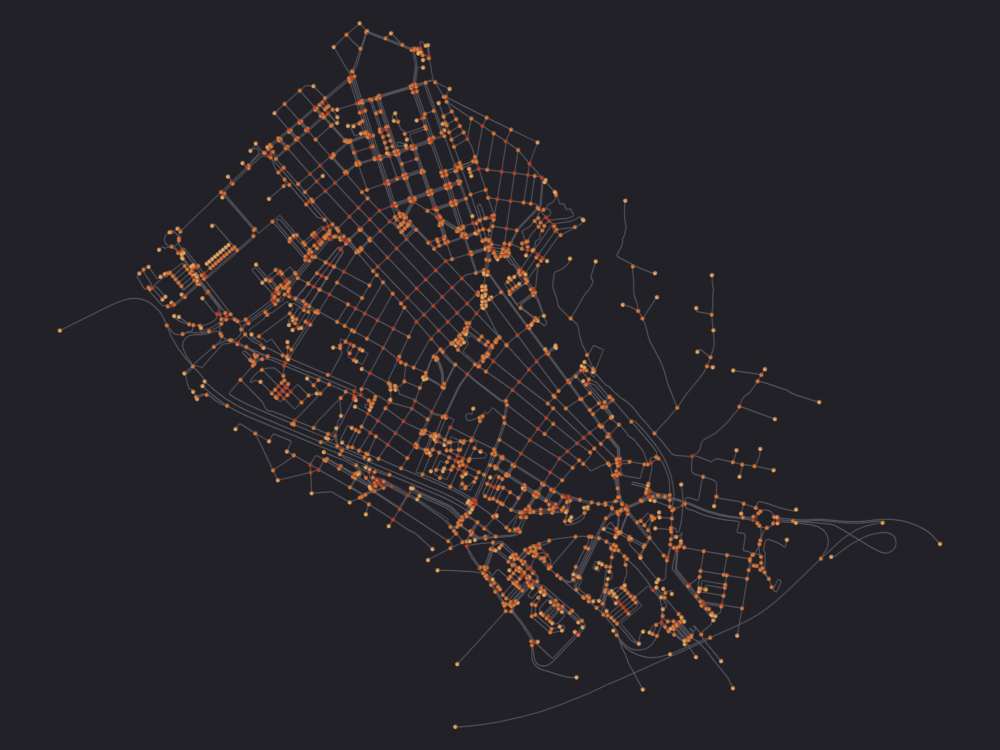
No terrain, buildings or aerial imagery: the specification decides what arrives, and a failed download leaves nothing. Guessing a center and radius for an unknown graph puts the network over the wrong kilometer; guessing a tile zoom fetches several hundred tiles. Call sg.context.add_context() once you know what the specification builds.
Style as in notebooks 00 to 07, from notebook 15: look='ink', straight down through an orthographic camera, top percentile clipped because street centrality is long-tailed and a few through-routes would take the whole ramp.
Colormap and color attribute are read out of the specification rather than named here, so the figure cannot contradict the file it renders. scigraphs.calculate_centrality writes centrality_<method> on the POINT domain, the method set by the operator’s default and by what scene_props managed to apply; with nothing computed the graph renders neutral.
On Blender’s Vulkan backend (the default on Linux) gpu.state.point_size_set does nothing for the add-on shaders, so POINT and DISK nodes come out 1 pixel wide in the SciGraphs engine, which notebook 05 still uses for the preview controls; notebook 06 does not, since SciGraphs.api.thin moved the edge sparsification into the mesh where EEVEE can see it. Start Blender with --gpu-backend opengl for any render you intend to look at.
The state of the scene depends on the specification
meta.clear_scene is True by default, so every run empties the scene first. Two run_pipeline() calls do not accumulate: the second erases what the first left, and if its data stage fails what remains is an empty scene. Render what a pipeline produces right after that run.
graphs = {o.name: o for o in bpy.data.objects if"num_nodes"in o.keys()}print(f"{len(graphs)} graph(s) left behind by the run in section 5")for name, obj in graphs.items():print(f" {name:<30}{obj.get('num_nodes'):>7,} nodes")def computed_attribute(obj):"""The scalar the pipeline's analysis step left behind, or None. `calculate_centrality` names its output after the method it ran, so the attribute is `centrality_degree`, `centrality_betweenness`, and so on. The notebook cannot know which without reading the mesh back: the specification decides. """for name, domain, _dtype in sg.graphs.attributes(obj):if name.startswith("centrality_") and domain =='POINT':return namereturnNoneif graphs:for name, obj inlist(graphs.items())[:2]: attribute = computed_attribute(obj)print(f"{name}: coloring by "f"{attribute or'(nothing: the run computed no centrality)'}")# An OSMnx import puts a vertex at every geometry point, so the median# nearest-neighbor distance the 0.35 default scales is a few meters and# draws a sphere under a pixel. Colormap-colored pixels at 1000x750:# 1.1 % at 0.35, 3.5 % at 0.9, 7.5 % at 1.6. By 1.6 the spheres have# swallowed the streets; 0.9 still reads as a network. nb.figure(obj, f"renders/19_repro/{name}", look='ink', colormap=my_spec["visual"]["colormap"], color_attribute=attribute, clip_high_pct=98, node_fraction=0.9)else:print("The pipeline left no graph. It is usually the download:")for error in result.errors[:3]:print(" ", error.strip().splitlines()[-1])# A rate-limited Overpass leaves nothing to render, which is not an engine# failure and must not be checked as one.if result.success: check("the pipeline left a renderable graph", bool(graphs))else:print("\nThe run in section 5 failed, so there is nothing to render. ""Try again in a little while.")
1 graph(s) left behind by the run in section 5
  OSMnx_StreetNetwork              2,302 nodes
OSMnx_StreetNetwork: coloring by centrality_degree
  Skipping Split Edges: 'is_intersection' present, keeping streets continuous
Info: Geometry Nodes modifier added
Info: Attribute -> centrality_degree  ·  centrality_degree -> turbo [rank]  [0 … 0.001738] on Point
[PASS] OSMnx_StreetNetwork.png legible — 9.8% ink (healthy range 0.5–60%)
[PASS] the pipeline left a renderable graph
7 · Running it again and comparing
Two runs of the same specification must give the same hash and the same outputs.
result_2 = run_pipeline(str(spec_path), stop_on_error=False, verbose=False)check("the hash is stable across runs", result.pipeline_hash == result_2.pipeline_hash, result.pipeline_hash)positions = pathlib.Path(result.output_dir) /"positions.csv"if positions.exists():import hashlib digest = hashlib.sha256(positions.read_bytes()).hexdigest()print("sha256 of positions.csv:", digest[:32])
Downloading OSM network (PLACE)...
  Place: Burjassot, Valencia, Spain
  Download completed in 1.83s
Total import time: 2.24s
  Nodes: 2,302, Edges: 6,980

Creating OSMnx graph: 2,302 nodes, 6,980 edges...
  Created 2,302 intersection vertices
    Created 1,000 edges...
    Created 2,000 edges...
    Created 3,000 edges...
  Created 3,440 street edges in 0.70s
Total OSMnx graph creation time: 0.70s
Graph saved to ~/.config/blender/5.2/scripts/addons/scigraphs_osmnx_cache/Burjassot_Valencia_Spain_walk.graphml
Graph cached to: ~/.config/blender/5.2/scripts/addons/scigraphs_osmnx_cache/Burjassot_Valencia_Spain_walk.graphml
Info: Downloading network from OpenStreetMap (PLACE)...
Info: Graph cached as: Burjassot_Valencia_Spain_walk.graphml
Info: Imported: 2302 intersections, 6980 street segments, 291.1 km total
  Skipping Split Edges: 'is_intersection' present, keeping streets continuous
Info: Geometry Nodes modifier added
Applied edge style preset: CYTOSCAPE_BEZIER
OSMnx graph detected - preserving original street geometry
Info: Applied 'CYTOSCAPE_BEZIER' preset
Graph projected to EPSG:32630
Info: Graph projected to EPSG:32630
  Skipping Split Edges: 'is_intersection' present, keeping streets continuous
  Rebuilt simple GN tree (attribute stripping updated)
Info: Centrality 'degree' calculated
Info: Graph exported to notebooks/out/07_repro/run/network.graphml
Error: Export failed
Info: Calculating statistics...
Info: Statistics report generated: notebooks/out/07_repro/run/statistics.txt
[PASS] the hash is stable across runs — aa4db7a3780070d8a2e83b2ab3bfc9abf79a404122233a6a2bb7ab2bc1fca3a2
The reverse route: this operator writes the specification that reproduces what you reached through the panel or earlier notebooks. It needs an active graph object, found by looking for num_nodes in it.
destination = OUTPUT_DIR /"current_scene.json"# Delete before writing, or a failed operator leaves the cell below reading the# previous run's file. That is how this notebook once reported 2302 nodes with# an empty scene.destination.unlink(missing_ok=True)graph =next((o for o in bpy.data.objects if"num_nodes"in o.keys()), None)if graph isNone:print("There is no graph in the scene; run notebook 13 or 04 first, ""or let cell 5 finish its download.")else: sg.graphs.activate(graph)print("active object:", graph.name, f"({graph['num_nodes']} nodes)")print("export_current_repro_spec ->", bpy.ops.scigraphs.export_current_repro_spec( filepath=str(destination), format='JSON'))if destination.exists(): serialized = json.loads(destination.read_text(encoding="utf-8"))print("sections:", list(serialized.keys()))print(json.dumps(serialized.get("meta", {}), indent=2, ensure_ascii=False))else:print("nothing written: the operator needs a scene with a graph loaded")
active object: OSMnx_StreetNetwork (2302 nodes)
Info: Pipeline spec exported to: notebooks/out/07_repro/current_scene.json
export_current_repro_spec -> {'FINISHED'}
sections: ['meta', 'dataset', 'visual', 'render']
{
  "title": "scene_OSMnx_StreetNetwork",
  "seed": 42,
  "output_dir": "//repro/exported",
  "description": "Exported from scene with 2302 nodes"
}
9 · In batches, from the terminal
One Blender process per specification isolates the failures:
env -u LD_LIBRARY_PATH is not optional on this machine: the OpenFOAM environment puts the system TBB ahead of the one Blender ships and startup dies with an undefined symbol error.
A local model can draft the specification from a sentence, through Ollama, so nothing leaves the machine. From a terminal:
python3 scripts/repro/ask.py "the pedestrian network of Burjassot colored by betweenness"--run
Notebook 20 does the same from here, and shows what happens between the model’s answer and the render: what gets stripped, what gets corrected, and one request it refuses to run.
10 · The options reference
Autogenerated from the schema, so it does not fall behind: